Top 10 Tips on Preventing Brute-Force Attacks – HostNamaste.com
The number of brute-force attacks targeting RDP endpoints increased significantly since the onset of the COVID-19 pandemic, according to cyber-security firm Kaspersky.
Since last few years has seen an increase in RDP & SSH brute-force attacks globally amid the stay-at-home orders. The influx of employees working from home increases the attack surface for hackers, and cybercriminals are taking advantage of it.
RDP stands for Remote Desktop Protocol, and is a technology that allows users to log into remote work stations across the internet. RDP may be used by both, telecommuters and tech support personnel that are troubleshooting an issue via a secure name and password. This leaves systems vulnerable to brute-force attacks, where cybercriminals try repeated login attempts with varying username and password combinations, attempting to guess the login credentials to gain permissions and access to data and folders.
SSH stands for Secure Socket Shell, this is a technology similar to RDP (“Remote Desktop Protocol”) that allows users to remotely access the equipment.
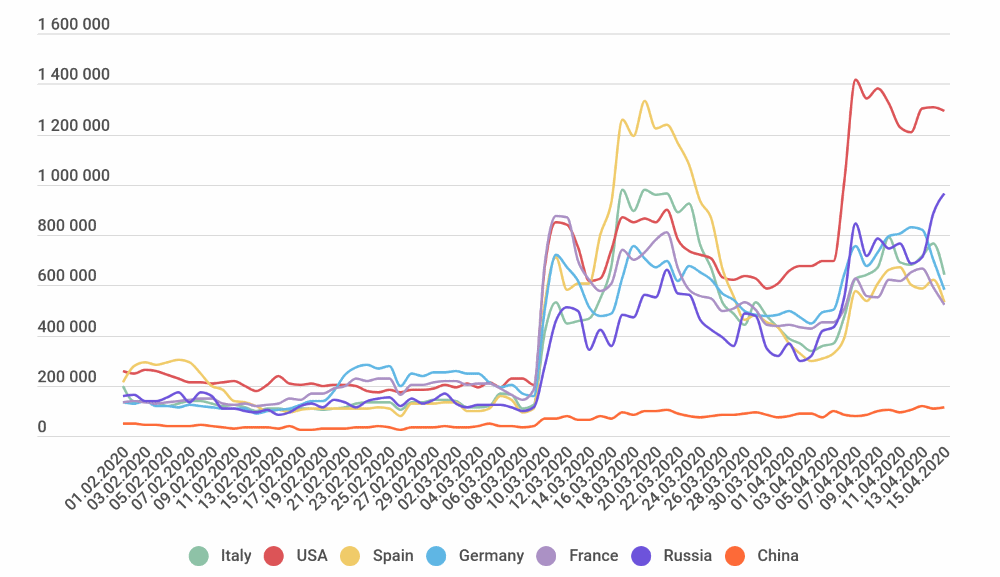
“One of the most popular application-level protocols for accessing Windows workstations or servers is Microsoft’s proprietary protocol — RDP. The lockdown has seen the appearance of a great many computers and servers able to be connected remotely, and right now we are witnessing an increase in cybercriminal activity with a view to exploiting the situation to attack corporate resources that have now been made available (sometimes in a hurry) to remote workers,” says Dmitry Galov, security researcher with Kaspersky.
According to the official website of the Department of Homeland Security, “The Cybersecurity and Infrastructure Security Agency (CISA) is aware of a recent increase in targeted Emotet malware attacks. Emotet is a sophisticated Trojan that commonly functions as a downloader or dropper of other malware. Emotet primarily spreads via malicious email attachments and attempts to proliferate within a network by brute forcing user credentials and writing to shared drives. If successful, an attacker could use an Emotet infection to obtain sensitive information. Such an attack could result in proprietary information and financial loss as well as disruption to operations and harm to reputation”
With brute force attacks, hackers are looking for an easy attack. The goal is to ensure that your server is not an easy target for these types of attacks. Changing the SSH & RDP ports helps protect against brute force attacks.
Your server has built-in defense mechanisms that ban an IP with multiple failed login attempts, which helps to to block these attacks. As a result, this causes the server to use more resources on banning IP’s, resulting in a slower performing server and/or website.
If you receive alerts or notice increased failed login attempts in your SSH authentication logs (usually located at /var/log/secure) or in your authentication event logs for Microsoft Windows, it would be a smart move to adjust your default access ports.
HostNamaste Server Management
By upgrading your server’s support coverage to our proactive managed tier, you’ll have peace of mind knowing your server is constantly being monitored. Additionally, we will handle changing ports, securing you from brute force attacks. By default, our Windows Dedicated Servers come with the port changes. When you install Windows from our Auto Installer, the port changes during the install.
With Linux, changing ports is handled via our Server Management with the option to have “Fail2Ban” installed on Linux machines. Fail2Ban is an intrusion prevention software framework that protects computer servers from brute-force attacks. With this installed, Multiple IPs with excessive failed SSH login attempts are blocked, protecting you from brute force attacks.
Changing The Port
Before proceeding, be sure to take a backup of your ssd_config file so that it can easily be restored.
- Login to your server via SSH (Putty)
- Open up the ssh config file: $ nano /etc/ssh/sshd_config
- find the line where it says Port 22 and change the 22 to a Dynamic and/or Private Ports number. Remember the number you use, as you will need to know this anytime you want to remotely manage your server.
- Save the file (Ctrl-X with nano). When it asks if you want to save your changes, type y for “yes.”
Restart the SSH daemon: # systemctl restart sshd
Changing The Port on Microsoft Windows:
- Start the Registry Editor
- Click the following registry subkey:
- HKEY_LOCAL_MACHINE\System\CurrentControlSet\Control\TerminalServer\WinStations\RDP-Tcp\PortNumber
- Choose Modify in the context menu and select Decimal.
- Enter the new port number and click OK.
- Close the Registry Editor.
Now that you have successfully changed the port, be sure to follow the below best practices to protect yourself against brute force attacks:
VPN
Organizations can add an additional layer of authentication to keep hackers out by setting up a VPN. It is important to secure a VPN with a strong password, or else it can be brute forced by bot attacks. Contact your account manager to set up a VPN today.
Top 10 Tips for preventing brute-force attacks:
-
Use Strong Passwords: Implement a password policy that requires the use of long, complex passwords that include a mix of uppercase and lowercase letters, numbers, and special characters. Avoid using common words, phrases, or personal information that can be easily guessed. Strong passwords are crucial for any business. Consider password length, complexity, and possibly password rotation to ensure their VMs and other critical enterprise systems are prepared for a brute-force attack.
-
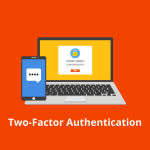
Implement Multi-Factor Authentication (MFA): Enable MFA on all accounts and systems to add an extra layer of security beyond just a password. This can include SMS, email, or app-based authentication methods. One of the best methods for securing authentication is Multi-factor authentication (MFA). MFA adds an extra layer of security to the standard login process. In addition to the username/password, many forms of MFA use a randomly generated, six-digit code to reassure a user’s identity.
-
Limit Login Attempts: Configure systems to lock out accounts after a certain number of failed login attempts, typically 3-5. This helps prevent brute-force attacks from succeeding by limiting the number of guesses an attacker can make.
-
Monitor and Analyze Login Attempts: Regularly review login logs and security event logs to identify any suspicious patterns or anomalies, such as a high volume of failed login attempts from a single IP address or location.
-
Implement Account Lockout Policies: In addition to limiting login attempts, implement account lockout policies that temporarily or permanently disable accounts after a certain number of failed attempts. This helps mitigate the impact of a successful brute-force attack.
-
Use Captchas or Other Challenge-Response Tests: Implement captchas or other challenge-response tests on login pages to verify that the user is a human and not an automated bot attempting a brute-force attack.
-
Keep Software and Systems Up-to-Date: Ensure that all software, operating systems, and security tools are kept up-to-date with the latest patches and security updates to address known vulnerabilities that could be exploited in a brute-force attack.
-
Implement Network-Level Security Measures: Use firewalls, intrusion detection/prevention systems, and other network security tools to monitor and block suspicious traffic patterns associated with brute-force attacks.
-
Educate Users on Best Practices: Regularly train and educate users on the importance of using strong, unique passwords, enabling MFA, and being vigilant for signs of suspicious login attempts or other security threats.
-
Consider Implementing Brute-Force Protection Services: Utilize third-party services or tools that specialize in detecting and mitigating brute-force attacks, such as web application firewalls or cloud-based security solutions.
By implementing these top tips, organizations can significantly reduce the risk of successful brute-force attacks and protect their systems and data from unauthorized access.
Our solutions address today’s security threats and provide robust protection for your website against brute force attacks. Contact a Host Namaste Solutions Architect to upgrade your server’s support coverage to our proactive managed tier.